Building Manotes: a local-first note-taking app with E2EE sync
Background
This blog post is important for me. I’m announcing Manotes, a local-first note-taking app with optional E2EE sync that I’ve built over the last two years.
I’m struggling with AuDHD, and finishing projects, or anything really, is hard at times. Manotes is not really finished, but it is a fairly complicated project that I use almost every day. This post is both a personal and technical story about that journey.
Falling in love with Reflect
In 2023, at the age of 20, I finished technical school, passed my final high-school exams, and started living on my own. I already had a remote part-time job in the field and continued to work there, now full-time.
At the same time, my problems with focus and organization were getting worse. I was reading a lot, finding new libraries, interesting blog posts, and random ideas, but I didn’t have a good place to save that knowledge. Finding something interesting and then not being able to find it later was the worst feeling.
That’s when I started to get into note-taking apps. I already knew Obsidian but it didn’t click. I randomly stumbled upon Reflect.app on Twitter and found it really cool. The idea of backlinking was something I hadn’t heard of before and it made a lot of sense for me. The pricing, if I remember correctly, was $120/year or $15/month, which felt reasonable.
I started my free trial of Reflect and loved it. Reflect Academy was also a great resource for learning this type of note-taking.
But then they removed monthly pricing. I had just started living on my own, and $120 was about one-sixth of my monthly income at the time. I wasn’t sure I would continue using Reflect for the whole year, so I wasn’t ready for that commitment. I did get my trial extended for another month.
I migrated to Logseq, used it for a bit, didn’t like it that much, got back to Reflect and bought the yearly plan a few months later.
First Manotes version
Fast-forward to the end of 2024: my Reflect subscription was ending. Some months I used Reflect a lot; other months it was mostly a place for TODO lists. I had a silly idea: what if I rewrote the subset of Reflect I was actually using?
I did a little investigation. From their posts and social media, I knew they were rewriting from an in-memory model to SQLite. I also checked that they were using ProseMirror as the editor.
By searching for reflect.app in README.md files on GitHub, I found that
they were sponsoring numerous open-source projects too.
I started the implementation with SQLocal for SQLite in the browser, React for the UI, Kysely as the query builder, and Remirror for the editor integration.
This was a naive implementation: I had a notes table with saved ProseMirror
JSON and an extracted title. Backlinks were written to a separate table and
regenerated whenever a note was created or updated.
This was quite easy to make. It worked reliably for me, was good enough for writing TODOs and random notes, and I used it instead of Reflect from that point forward.
In April 2025 I tried to add sync to this app. I didn’t really understand how CRDTs worked yet, and I mostly vibe-coded the sync layer as a custom Yjs WebSocket provider. It kind of worked, but I wasn’t confident in the implementation and didn’t use it.
Rewriting Manotes
My failed attempt at sync kept bugging me in the following months. I started reading and collecting resources. I read the local-first essay, watched the Linear talks on sync, studied the architecture of LiveStore, and learned how to actually deal with CRDTs.
In October 2025 I more or less knew what direction I wanted to go, and I started a ground-up rewrite of Manotes. The rest of this post focuses on the technical side of that rewrite: the architecture, design decisions, and lessons learned.
Tech stack
Before going into the architecture, let’s quickly look at the main technologies I picked.
ProseMirror - A battle-tested library for creating text editors. It has a good document model and is simple, though not always easy, to extend. I use it through ProseKit, a higher-level abstraction created by ocavue, one of the Reflect team members.
Yjs - A CRDT library that works nicely with ProseMirror and is widely used for browser-based collaborative data.
Effect.ts - “Production-grade TypeScript”: typed errors, dependency injection, and resource management. This was my first time using Effect in a bigger project, and it was one of the best decisions I made.
SolidJS - A signals-based UI framework for JavaScript. It plays nicely with both ProseMirror, because SolidJS doesn’t do unnecessary rerenders or use a virtual DOM, and Effect, because it makes syncing external reactive state into the UI straightforward.
Architecture
Constraints
The main constraint was that I wanted Manotes to be local-first software. In practice, that meant:
- Fast
- Multi-device
- Offline - sync optional per graph
- Privacy - E2EE for synced graphs
- User control - self-hostable
By graph, I mean a separate set of notes that can be interconnected by backlinks.
Some local-first ideals, like collaboration, are intentionally out of scope because this is a personal app. Others, like longevity, meaning long-term data preservation, still need more work.
I failed at sync in the first version, so this time I wanted a model I could reason about. I came to the conclusion that the best approach would be event sourcing, similar to what Linear and LiveStore do. The model is simple:
Event log
The client event log has the following shape:
| Column | DB representation | Content |
|---|---|---|
| localSeq | integer, primary key, autoincrement | sequence number in local event log, assigned at the event creation |
| noteId | text, not null | identifier of the note to which the event is applied |
| type | text, not null | event type, currently update |
| payload | blob, not null | Yjs update bytes |
| createdAt | text, not null | ISO 8601 datetime of creation |
| id | text, not null, unique | event id for deduplication/retry |
| commitSeq | integer, unique | server-assigned order, null for pending/local-only events |
Each mutation is recorded as an event in this table. localSeq is assigned when
the event is created and is used as the local materialization order.
The event log is only mutation history. Tables used by the UI, search, and other features are materialized from it and can be rebuilt from the source events.
There is also commitSeq, which always stays null for local-only graphs. I’ll
discuss its role in sync later.
For now Manotes supports only one event type: 'update', with a Yjs update
encoded as binary data.
Materialization
The UI doesn’t read directly from the event log. Events are applied in order to
produce the current state, and the localSeq of the last materialized event is
stored in the materialization_checkpoint table.
While the app is running, a live query looks for events newer than the last
applied event, applies them in localSeq order, and updates the materialization
checkpoint.
As a result, two tables are created: notes, which stores notes and their
metadata, and backlinks, which stores relations between notes. Both tables can
be rebuilt from the event log.
Workers
But where does materialization run? I wanted Manotes to work across multiple browser tabs, so running materialization independently in each tab was not a good option. A SharedWorker also wasn’t enough because the SQLite/OPFS setup I wanted relies on APIs that are only available in Dedicated Workers.
The trick was to combine a SharedWorker with a DedicatedWorker. The first open tab acquires a lock, becomes the leader, and creates a DedicatedWorker. The SharedWorker is connected to that DedicatedWorker and routes messages from all tabs to it.
When the leader tab closes, the lock is released and another tab can become the leader.
The DedicatedWorker owns things like materialization and sync.
Reactive UI pipeline
Events are recorded and materialized into tables, but the UI still needs to react to those changes. For that, I use reactive SQLite queries.
The flow starts with a Drizzle live query, backed by Effect SQL. Each time the
underlying tables change, the query reruns and emits new values into an Effect
stream. The stream then updates a SolidJS store using reconcile, which avoids
unnecessary rerenders when parts of the result did not change.

Here’s a simplified version of how the reactive note search is implemented:
// Domain code:
const search = Effect.fn("NoteRepo.search")(function* (filter: string) {
  return yield* db.reactiveQuery((db) =>
    db
      .select({ id: Tables.notes.id, title: Tables.notes.title })
      .from(Tables.notes)
      .where(like(Tables.notes.title, `%${filter.trim()}%`)),
  );
});

// In UI component:
function Component() {
  const [filter, setFilter, filterAtom] = createAtomState("");

  const notes = createAtomStore(
    bindRt((rt) =>
      rt.atom((get) => {
        const filter = get(filterAtom);
        return search(filter).pipe(Stream.unwrap);
      }),
    ),
    [] as { id: string; title: string }[],
  );

  return (
    <div>
      <input value={filter()} onChange={/* setFilter() */} />
      <For each={notes}>{/* ... */}</For>
    </div>
  );
}
Graph runtimes
You may have noticed bindRt in the code snippet above. Manotes supports
multiple graphs on one device. Some can be in sync mode, while others are fully
local.
bindRt gives UI code access to the graph runtime for the currently open graph.
A graph runtime is constructed once per graph and contains services scoped to
that graph: database access, main-thread worker setup, sync state, and other
graph-specific context.
There is also a graph access layer that creates and manages graph runtimes. The list of graphs available on the device is stored in a small registry database. Each graph then has its own SQLite database.
Sync mode
Up to this point I mostly described how the app works in local-only mode. The whole system was designed so that sync mode would extend local-only mode rather than become a separate system.
I skipped the role of commitSeq in the event log section, but it is the key
field for sync. It is assigned by the server when an event is accepted and
represents the authoritative event order.
In this model, local-only graphs and synced graphs use the same event log
structure. The difference is that in local-only mode every event keeps
commitSeq = null. In sync mode, only not-yet-synced events have
commitSeq = null, so there is no separate pending events table.
When I need device-local order, I sort by localSeq. When I need authoritative
server order, I sort by commitSeq, followed by uncommitted events ordered by
localSeq.
Because both modes use the same event log shape, materialization can be shared between synced and local-only graphs.
Sync protocol
Before going into the sync protocol, here’s how the server stores events:
| Column | DB representation | Content |
|---|---|---|
| commitSeq | integer, primary key, autoincrement | authoritative sequence number assigned by the server |
| id | text, not null, unique | event id used for deduplication |
| streamRef | blob, not null | opaque stream reference, not a backend note id |
| payload | blob, not null | encrypted event payload |
| createdAt | text, not null | ISO 8601 datetime of creation |
This mostly resembles the local event log, with a few differences. There is no
localSeq, because the server only stores authoritative history. noteId is
replaced with streamRef, which is basically a note reference opaque to the
server.
The sync protocol is intentionally small, with just six messages:
| Direction | Message | Content |
|---|---|---|
| client → server | Connect | graphId, lastCommitSeq |
| client → server | Commit | baseCommitSeq, pending events |
| server → client | Replay | committed events after client’s lastCommitSeq |
| server → client | ReplayDone | upToCommitSeq marker for completed replay |
| server → client | CommitAck | committed version of events sent by this client |
| server → client | Committed | committed events created by other connected clients |
Sync starts with the client sending a Connect message to the server. The
message carries graphId, to confirm that the client is syncing the correct
graph, and lastCommitSeq, the latest authoritative event present on the
client.
The server checks whether it has events with commitSeq greater than the
client’s lastCommitSeq. If it does, it sends those events in paginated
Replay messages.
When the client receives events via Replay, it inserts them into the local
event log. From there they go through the same materialization pipeline as local
events.
If there are no events to replay, or all replay messages have already been sent,
the server sends ReplayDone.
After replay is complete, the client can commit pending events using a Commit
message. This enforces the catch-up-before-push invariant: the client must be up
to date before the server accepts new events from it.
When there are pending events, the client sends them in Commit and waits for
CommitAck. To prevent consistency issues, Commit includes baseCommitSeq.
If baseCommitSeq does not match the server’s max commitSeq, the commit is
rejected and the client has to catch up first.
When the client receives CommitAck, it assigns the returned commitSeq values
to the local events it just committed.
Events committed by one client are broadcast to other connected clients via the
Committed message. Those clients apply them the same way they apply replayed
events.
On the client, the protocol is implemented as a state machine to prevent invalid states. On the server, the protocol is designed so that no per-connection sync state has to be stored.
Invalid messages are rejected and the connection is reset.

The current event type, update, does not need strict commit order by itself.
The protocol still enforces that order for future event types like deletion and
compaction.
Server topology
I’ve chosen the Cloudflare ecosystem for deployment and backend infrastructure. This architecture maps well to Durable Objects. Each graph has its own Durable Object with a SQLite database for the event log and hibernable WebSockets for long-lived sync connections.
The Cloudflare Worker is only used for authentication and routing the request to the correct Durable Object.
I don’t love the Cloudflare lock-in, but the protocol is fairly simple and should be relatively easy to migrate to anything that supports WebSockets.
E2EE
For synced graphs, each graph has a graphKey. The graphKey is stored in an
encrypted envelope. The key itself does not have to change when the password
changes; only the envelope has to be changed.
The encrypted payload stores the real noteId and the actual event data. The
payload is encrypted with AES-GCM, with a fresh IV for every event.
streamRef is derived from noteId using HMAC-SHA256. The server can see that
multiple events belong to the same stream, but it can’t see the real note id.
This matters especially for daily notes, where the noteId is the ISO 8601 date
of that day.
The server can still see metadata, such as graph name, timing, event sizes, event order, and stream activity.

Data on the client is not encrypted.
Compaction
Event logs have one obvious disadvantage: they grow. They store the mutations that produced the current state, not just the current state itself, so they are usually larger than a plain snapshot. This matters especially when syncing a fresh device.
I have a few ideas for solving this. One is event compaction: after some number of events, a range of older events could be replaced with one compacted event that stores the merged mutation set. This would reduce both the number of events and their total size.
Another option is snapshots: a fresh device could start from the latest snapshot and then replay only the events that came after it. Compaction looks more compelling to me, because compacted events could also be used to display note history.
The server cannot compact encrypted data, so compaction has to happen on the client. This is one reason the catch-up-before-push invariant matters: clients need a complete view of the committed history before they can safely create a compacted event.
The system is mostly ready for such a mechanism, but I haven’t implemented it yet.
Implementation notes
A lot of time went into designing the architecture described above, but even more time went into the actual implementation. I won’t go through every little thing, but below are some highlights.
Custom wa-sqlite backend and cache
In my system, titles of backlinked notes are resolved with a SQL query to keep the system simpler. When a note title changes, I don’t have to go through every note that links to it and update the title there. That works well as long as the database is fast. It wasn’t, so I started looking for the cause.
I benchmarked the SQLocal-based implementation and got surprisingly bad results.
Resolving a note took around 66ms, reactive preview first emission took around
20-23ms, and backlink resolution took around 130ms end-to-end.
I dug into it a bit and found The Current State of SQLite Persistence on the
Web. It recommended
using wa-sqlite with OPFSCoopSyncVFS. The issue was that there wasn’t a
ready-to-use library that would let me use it easily with my Effect setup.
I found another possible solution: I built a small SQLite/WASM Effect SQL
adapter, based on @effect/sql-wasqlite, and changed it to use
OPFSCoopSyncVFS. I was shocked that it worked. The results
were much better: resolving a note dropped to around 16ms, reactive preview
first emission to around 3.7ms, and backlink resolution to around 13ms.
But it could have been even better. If a given backlink was present more than once, each occurrence resulted in a new DB call.
As I pointed out earlier, my reactive pipeline was using Effect streams. That
allowed me to use RcMap, Stream.share, replay: 1, and a short idle TTL to
make a cache whose entries are removed after a short period of inactivity. The
interesting property was that this cache was always up to date, because it
was backed by reactive queries.
There was one more easy improvement. I’m using TanStack Router, so I also pre-warmed the cache in loaders.
All of that made editor load times feel much better.
View transitions
The editor loaded much faster, but it still wasn’t instant, so route changes could flicker. The solution was to animate route changes using the browser View Transitions API.
This wasn’t completely automatic. Daily notes use a virtualized list so they can scroll infinitely into the past and the future, and sometimes the browser would capture an empty frame before the list was measured. For that case, I used a small opacity transition instead. Note pages also wait until the editor is no longer loading before showing the content.
Status
I’ve been using Manotes daily for a few months now. My own graph currently has 11,171 events and 2,690 notes, partially imported from Reflect. It does its job for me.
I’m not trying to build a product that has to sell. Manotes is primarily the note-taking app I use every day, secondarily a portfolio piece, and only then something I may want to develop into a real product. If that ever happens, it will be extremely cheap.
The currently available features are:
- Backlinks with incoming backlink previews
- Daily notes with calendar navigation and infinite scrolling
- Note search / command palette
- Multiple local graphs
- Multi-tab support
- Offline app loading
- Import/export backups
- Browser extension for backlinking to currently open tabs (for now, you have to build it from source)
- Synchronization (currently gated by waitlist)
That being said, it’s definitely not finished. A lot of things are still missing, including:
- Desktop application
- Good mobile support
- Ability to attach files to notes
- Deletion and compaction
- Account/session management improvements
- More ergonomic note creation
- Semantic full-text note search
- LLM integrations
- Proper observability
If you want to try it anyway, you can do that at manotes.dev. Local-only mode is available right away, and sync mode is hidden behind a waitlist.
Manotes is open-source and MIT licensed. Feel free to explore the repository.
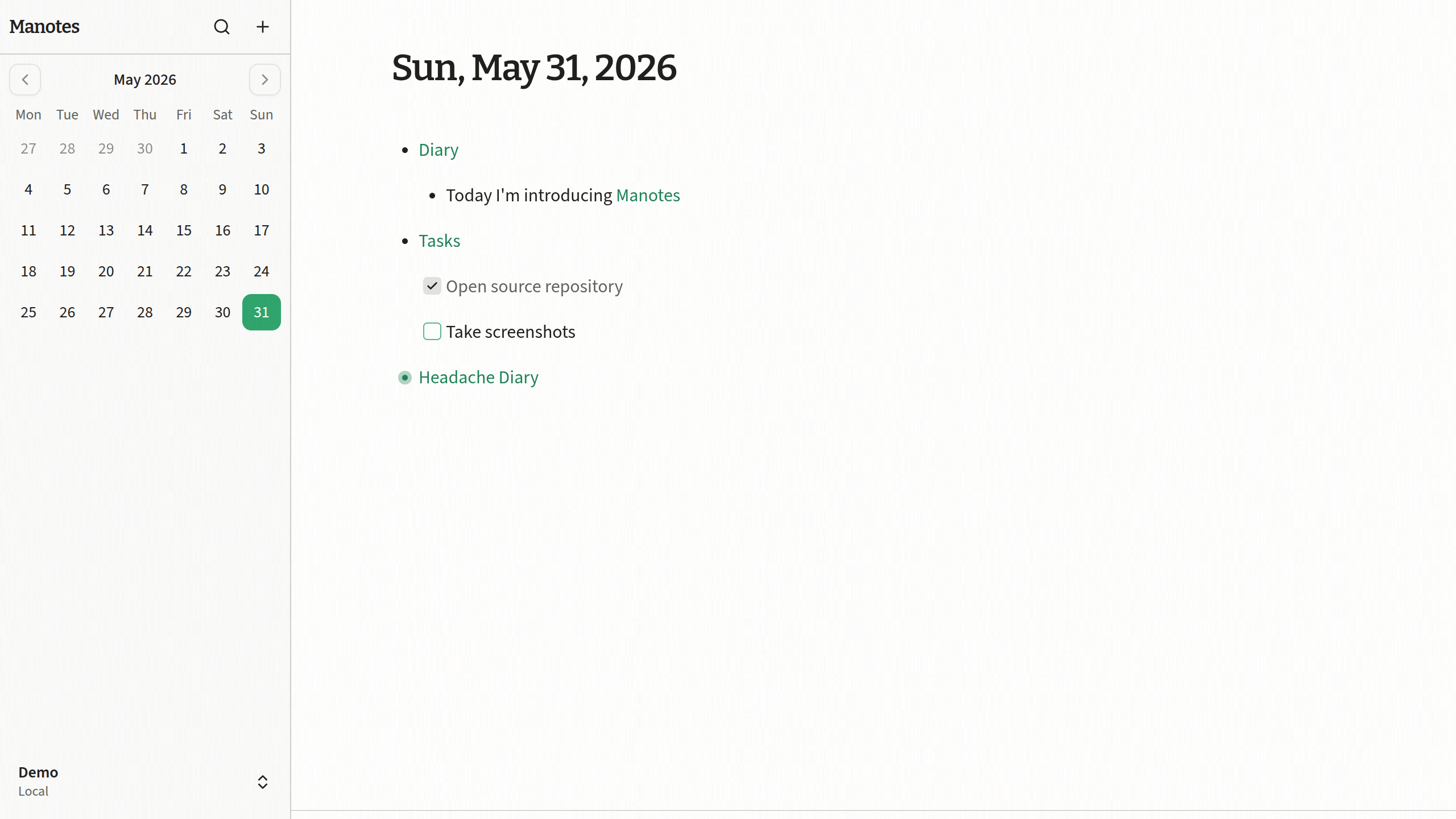
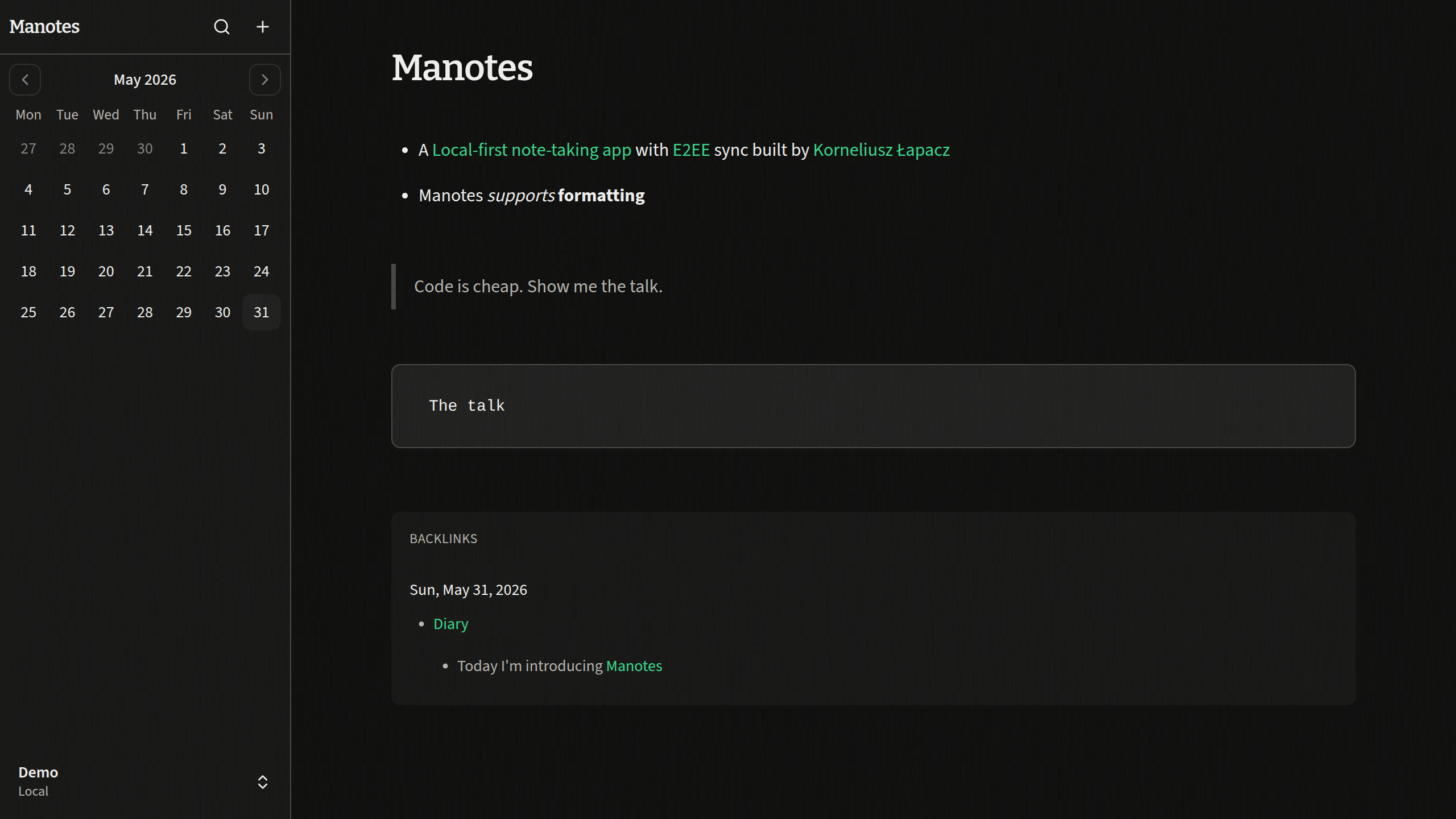
Screenshots
I didn’t want to put screenshots at the top of this post, because most of it is about the story and architecture behind Manotes. Still, it is nice to show what the app actually looks like.
Final thoughts
If you’re looking for something stable, I can definitely recommend Reflect. Other projects, like Ideaflow, also look promising.
This post already got quite long, and I’ve spent a lot of time writing it, but there are still topics I didn’t cover: my use of AI during implementation, documenting the work through devlogs, and probably a few others. Let me know if you would like me to write about those too.
Anyway, thanks for reading. Leave a comment or reaction if you feel like it.
Happy coding!